Assetto Corsa as a multiplayer racing simulation
Assetto Corsa by Kunos Simulazioni is one of the most precise racing simulations on PC. Alongside a comprehensive single-player mode, multiplayer via a dedicated server is the core of the community: clubs, leagues and open servers run shared sessions with realistic physics and community content (tracks and cars via mods).
Your own server gives you full control over vehicle classes, tracks, weather conditions, session lengths and rules — without relying on official servers or someone else's lobby.
Ordering a server
To start your own Assetto Corsa server, select the game in the order wizard. At game-serverhosting.de the dedicated server runs pre-configured in the panel — no manual Linux installation, no firewall setup by hand.
After ordering, your server will be ready in a few minutes. The dashboard shows you the status once the server switches to "ready".
Installing the Assetto Corsa Dedicated Server
The official Assetto Corsa Dedicated Server (Steam App ID 302550) is installed, updated and started fully automatically at game-serverhosting.de — you never run SteamCMD, download server files or start anything by hand. After ordering, your server is ready to play within minutes.
You only take care of the configuration — conveniently through the guided editor and the built-in file manager in the panel.
Guided configuration editor in the panel
The fastest way to configure your server is the guided editor built right into the panel on the server management page. Instead of editing server_cfg.ini by hand, you set the player count, session rules, realism options (ABS, traction control, damage, fuel rate, tyre wear) and voting settings through clearly labelled fields with help text. Every change takes effect on the next server restart.
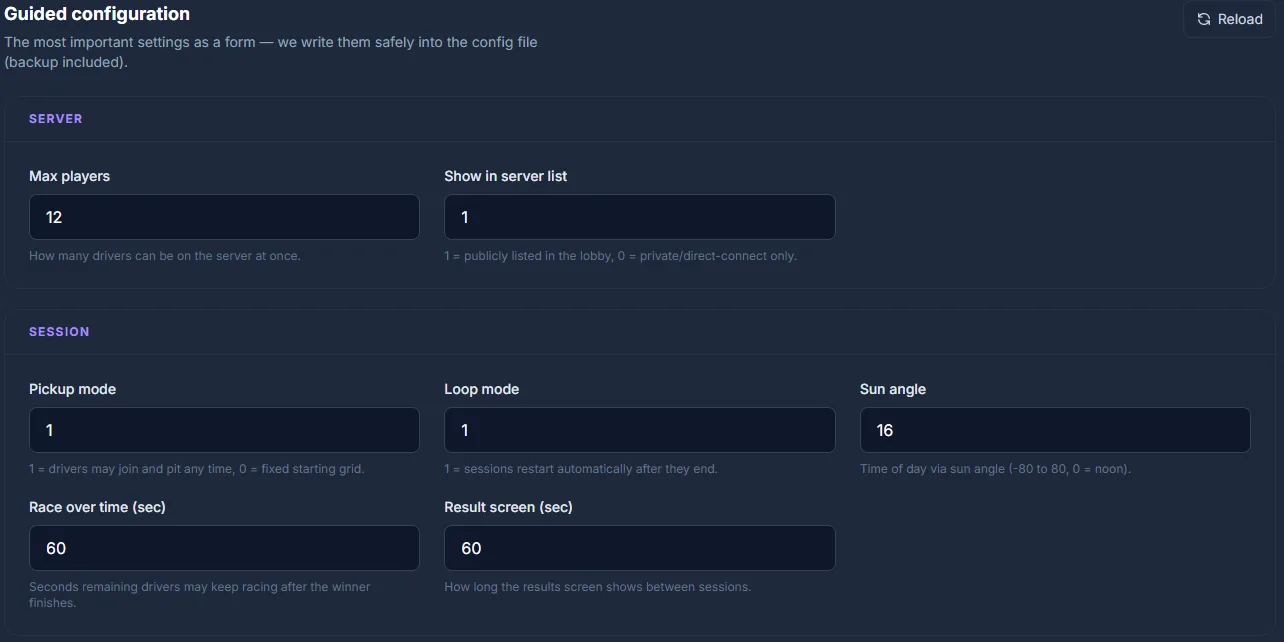
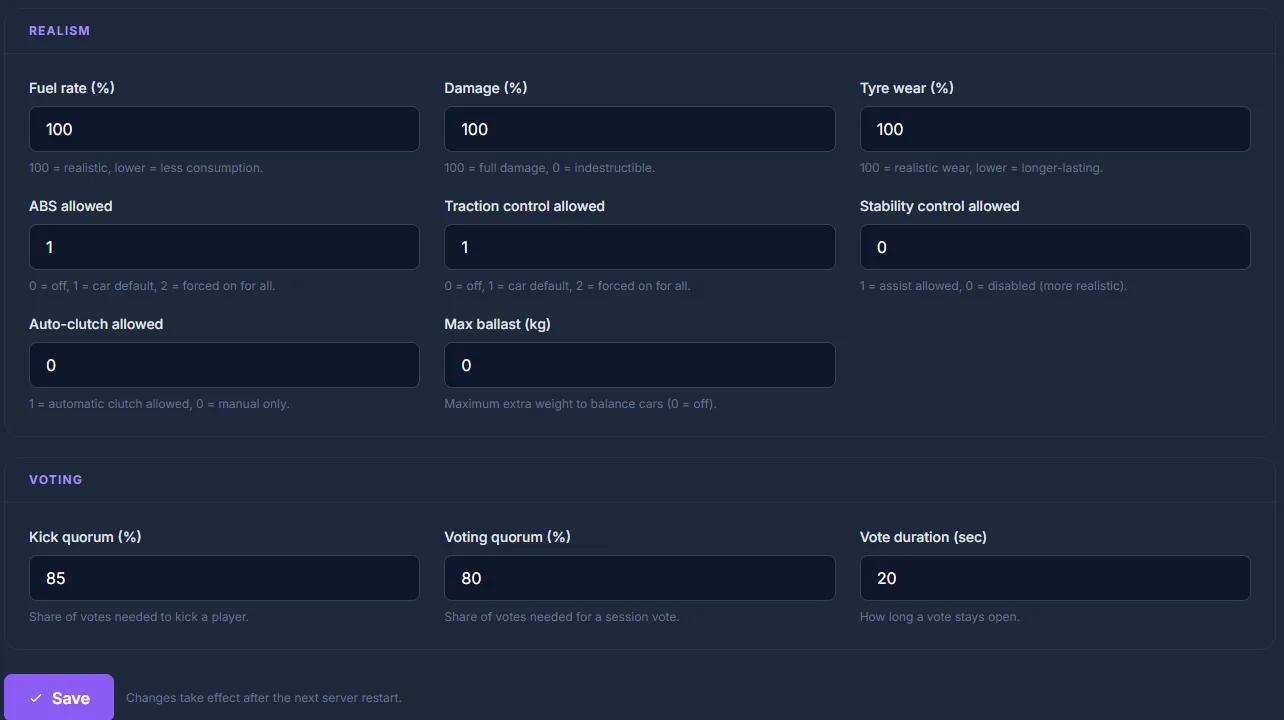
If you need full control over every detail (tracks, car lists, slots), you can still edit the files directly — the sections below describe their exact structure.
Required files: server_cfg.ini and entry_list.ini
The AC Dedicated Server is controlled by two files:
server_cfg.ini — Base configuration
[SERVER]
NAME=My AC Server
CARS=ks_mazda_mx5_nd;ks_bmw_m3_e92
TRACK=ks_nordschleife
TRACK_LAYOUT=
MAX_CLIENTS=16
RACE_OVER_TIME=60
ALLOWED_TYRES_OUT=2
ABS_ALLOWED=1
TC_ALLOWED=1
STABILITY_ALLOWED=0
AUTOCLUTCH_ALLOWED=1
TYRE_BLANKETS_ALLOWED=1
FORCE_VIRTUAL_MIRROR=0
REGISTER_TO_LOBBY=1
PICKUP_MODE_ENABLED=1
SLEEP_TIME=1
VOTING_QUORUM=75
VOTE_DURATION=20
BLACKLIST_MODE=0
CLIENT_SEND_INTERVAL_HZ=18
DAMAGE_MULTIPLIER=100
FUEL_RATE=100
TYRE_WEAR_RATE=100
PASSWORD=
ADMIN_PASSWORD=myAdminPassword
HTTP_PORT=8081
UDP_PORT=9600
TCP_PORT=9600
MAX_BALLAST_KG=0
Key fields:
CARS: Semicolon-separated list of vehicle IDs (from thecontent/cars/directory)TRACK: Track ID (fromcontent/tracks/)MAX_CLIENTS: Maximum number of players (depending on your server package)TCP_PORT/UDP_PORT: Default 9600 — your actual port is shown in the panel connection detailsHTTP_PORT: For the manager web service (default 8081)
entry_list.ini — Vehicle slots
[CAR_0]
MODEL=ks_mazda_mx5_nd
SKIN=red
SPECTATOR_MODE=0
DRIVER_NAME=
DRIVER_TEAM=
DRIVER_GUID=

[CAR_1]
MODEL=ks_bmw_m3_e92
SKIN=white
SPECTATOR_MODE=0
DRIVER_NAME=
DRIVER_TEAM=
DRIVER_GUID=
A [CAR_N] entry must exist for every MAX_CLIENTS slot. Leave DRIVER_NAME and DRIVER_GUID empty for open slots (Pickup Mode).
Configuring sessions
Sessions define the duration of practice, qualifying and race segments:
[PRACTICE]
NAME=Free Practice
TIME=30
IS_OPEN=1

[QUALIFY]
NAME=Qualifying
TIME=15
IS_OPEN=1

[RACE]
LAPS=10
WAIT_TIME=60
IS_OPEN=0
TIME: Session duration in minutesLAPS: Race distance in laps (alternatively useTIMEfor time-based races)IS_OPEN=1: Players can join mid-session
Adding tracks and cars
Kunos-original content (ks_*) is included in the Dedicated Server package. For mod tracks and cars:
- Extract the mod archive
- Upload the folder to
content/tracks/(track) orcontent/cars/(car) - Enter the ID (folder name) in
server_cfg.ini
In the game-serverhosting.de panel you use the file manager for the upload. After uploading, restart the server so the content is detected.
Mod sources
| Source | Content |
|---|---|
| RaceDepartment (racedepartment.com) | Tracks, cars, skins — largest community library |
| AC Discord | Curated mod lists for leagues |
| Kunos original content | Always prefer — best physics quality |
Content Manager as an admin tool
Content Manager (content-manager.io) is the unofficial but largely indispensable frontend for AC server administration. It provides a GUI for:
- Server configuration (GUI instead of editing
.inifiles) - Car approval and skin selection
- Session scheduling and rule sets
- Live overview of connected players
You use Content Manager on your local PC and connect it to your game-serverhosting.de server via IP + TCP port.
Ports and firewall
| Port | Protocol | Use |
|---|---|---|
| 9600 | TCP | Player connections |
| 9600 | UDP | Player data stream |
| 8081 | TCP | HTTP manager interface |
At game-serverhosting.de these ports are opened automatically. Your actual port numbers (may differ) are shown in the panel connection details.
Common issues
Server doesn't appear in the lobby list
Make sure REGISTER_TO_LOBBY=1 is set and the UDP port is reachable. At game-serverhosting.de this is configured automatically.
Vehicle ID not recognised
Check the exact folder name in the content/cars/ directory — the ID is case-sensitive on Linux servers.
Players get "Wrong checksum" The player has a different mod version than the server. Make sure all players have the same version of the mod installed.
Server won't start after a configuration change
Check for syntax errors in server_cfg.ini (missing separators, wrong encoding). The number of [CAR_N] entries must exactly match MAX_CLIENTS.
Conclusion
Your own Assetto Corsa dedicated server gives you full control over tracks, vehicles, session rules and access. Via server_cfg.ini and entry_list.ini you configure everything from vehicle class to race distance. Content Manager makes administration much easier.
Rent an Assetto Corsa server →
FAQ
Which vehicles and tracks are included in the Dedicated Server?
The official AC Dedicated Server (Steam App 302550) includes all Kunos-original content (ks_* prefix): Nordschleife, Monza, Spa, Silverstone and more tracks, plus vehicles from Ferrari, BMW, Lotus, Mazda and others. Mods must be uploaded separately.
Do I need my own Steam copy of Assetto Corsa to run a server?
No — the dedicated server is a separate freely downloadable app (App ID 302550). Players naturally need the main game, but running the server itself is free.
How many players can an AC server host?
Technically up to 24 players; in practice 12–16 is recommended for smooth racing. With more players the data traffic increases significantly — adjust MAX_CLIENTS to match your booked server package.
Can I run season rounds with fixed car assignments?
Yes — enter each driver's DRIVER_GUID (Steam ID64) in entry_list.ini. This gives each driver their assigned slot and car, regardless of join order.