Team Fortress 2 — a classic with an active community
Team Fortress 2 (TF2) by Valve has been a multiplayer shooter staple since 2007. The free-to-play model and active modding community keep thousands of players active on community servers every day. On your own server you have full control over maps, game modes, plugins and access restrictions.
The TF2 Dedicated Server is built on the Source engine and is configured via server.cfg and ConVars. SourceMod (the plugin framework for Source engine servers) extends the possibilities considerably.
Ordering a server
Select Team Fortress 2 in the order wizard. At game-serverhosting.de the dedicated server runs pre-configured — including GSLT support (required for Valve Quickplay and to avoid ban issues).
After ordering, your server will be ready in a few minutes. You can monitor the current status in the dashboard.
GSLT token — set up automatically
Since 2021, every TF2 community server needs a Game Server Login Token (GSLT) — without one the server won't accept players via Valve matchmaking and isn't visible in Quickplay.
At game-serverhosting.de you don't have to deal with this: your TF2 server is automatically assigned its own GSLT when it's created (written to the STEAM_ACC startup variable). No manual creation on Steam, no copying tokens — the server is matchmaking- and Quickplay-ready from the start.
Why the GSLT matters
- Without a GSLT, bot spam connections land on your server
- Valve can enforce better anti-cheat measures server-side
- Quickplay visibility only works with a valid GSLT
Using your own token (optional)
You can use your own GSLT instead — for example one you create at https://steamcommunity.com/dev/managegameservers (App ID 440). Enter it in the panel under the startup variables; it overrides the automatically assigned token:
STEAM_ACC=YOUR_GSLT_TOKEN
Editing server variables in the panel
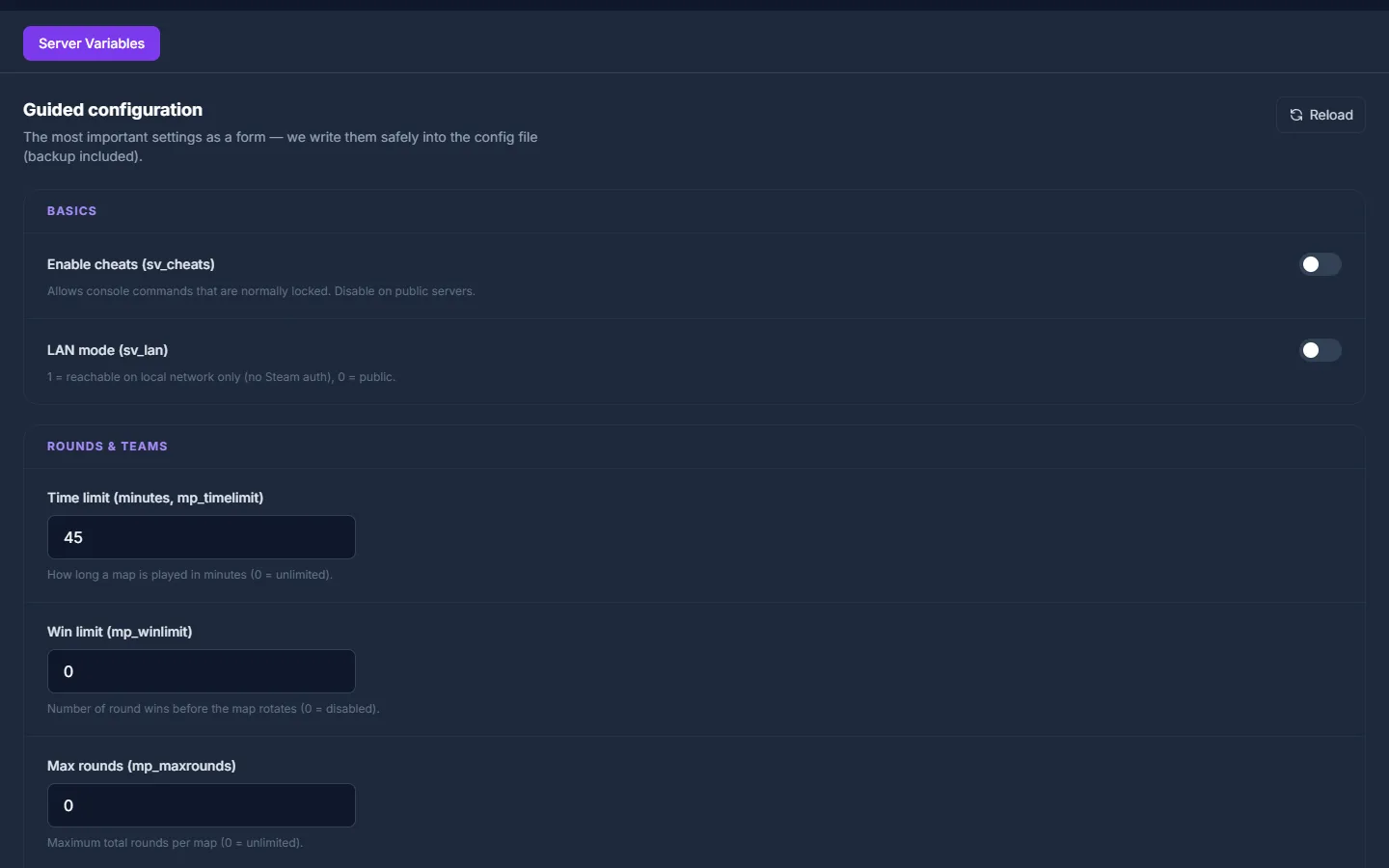
The fastest way to configure TF2 is the guided editor built right into the panel on the server management page. Player cheats (sv_cheats), round limits (mp_timelimit, mp_winlimit, mp_maxrounds), team balance (mp_autoteambalance) and friendly fire are set through clearly labelled fields with help text — no manual file editing. game-serverhosting.de writes your changes safely back into tf/cfg/server.cfg, including an automatic backup. You'll find the editor under Game settings → Server variables.
Editing server.cfg manually (advanced)
If you need full control over every ConVar, you can still edit the server.cfg in the tf/cfg/ directory directly — it controls the basic server settings:
// Server name
hostname "My TF2 Server"

// Player maximum
sv_maxplayers 24

// RCON password for remote control
rcon_password "MyRCONPassword"

// Server password (empty = public)
sv_password ""

// Physical region (for latency optimisation)
sv_region 3

// Send heartbeat to Steam master server
heartbeat

// Prevent player cheats
sv_cheats 0
sv_pure 1

// Pure server mode (prevents client modifications)
sv_pure_kick_clients 1

// TF2-specific: Casual/Competitive settings
mp_tournament 0
mp_teams_unbalance_limit 1
mp_autoteambalance 1
💡 As shown above,
sv_cheats,mp_timelimit,mp_winlimit,mp_maxrounds,mp_autoteambalanceandmp_friendlyfirecan also be set comfortably in the guided editor — editing by hand here is only needed for ConVars beyond the form fields.
Setting up maps and the mapcycle
Create a mapcycle file
Which maps are played in rotation is controlled by tf/cfg/mapcycle.txt:
cp_dustbowl
ctf_2fort
koth_harvest_final
pl_badwater
cp_granary
koth_nucleus
ctf_turbine
pl_upward
Use the official map prefix scheme:
| Prefix | Game mode |
|---|---|
cp_ |
Control Points |
ctf_ |
Capture the Flag |
koth_ |
King of the Hill |
pl_ |
Payload |
arena_ |
Arena |
mvm_ |
Mann vs. Machine |
Changing the current map
Via RCON (or the panel console):
rcon changelevel koth_harvest_final
rcon mp_nextmap cp_dustbowl
Adding custom maps
Upload custom maps (.bsp files) to tf/maps/. Add them to the mapcycle and enable sv_allowdownload 1 — players will download them automatically on join.
Installing SourceMod
SourceMod is the standard plugin framework for TF2 servers. It provides an admin system, a rights management tool and a huge plugin library.
Installation
- Download MetaMod:Source: https://www.sourcemm.net/downloads.php
- Download SourceMod: https://www.sourcemod.net/downloads.php
- Extract both archives into the
tf/directory (structure:addons/metamod/,addons/sourcemod/) - Restart the server — SourceMod loads automatically
In the game-serverhosting.de panel you upload the files via the file manager.
Adding admins
Admin rights are granted in addons/sourcemod/configs/admins_simple.ini:
"STEAM_0:1:12345678"    "99:z"     // Superadmin (all rights)
"STEAM_0:0:98765432"    "bdk"      // Moderator (ban, kick)
Find your Steam ID at https://steamid.io/ — paste your profile URL there.
Popular TF2 SourceMod plugins
| Plugin | Function |
|---|---|
TF2 Scramble |
Team scramble after a round for balance |
TF2 RTD |
Roll the Dice — random effects per round |
AFKManager |
Automatically kick AFK players |
SteamFriendsList |
Anti-cheat via friend-list check |
MapChooser |
Vote-based map rotation |
TFTrue |
Competitive rule sets (whitelist etc.) |
Plugins are placed as .smx files in addons/sourcemod/plugins/.
Key sv_ ConVars
Beyond server.cfg you can set many values via RCON or in the startup config:
// Respawn wave time
mp_respawnwavetime 10

// Critical hits
tf_weapon_criticals 1
tf_weapon_criticals_melee 2

// Player count for automatic match start
mp_minplayers 6

// Round time limit in minutes
mp_timelimit 30

// Overtime
mp_overtime_enable 1

// Voice chat (0 = disable)
sv_voiceenable 1
Quickplay and visibility
For your server to appear in TF2 Quickplay:
- A valid GSLT token must be set
sv_tagsmust use allowed values (no locked tags such asincreased_maxplayers)heartbeatentered inserver.cfg- Server must be stably reachable (no timeouts on the Valve master server heartbeat)
Common issues
Bots join immediately after startup Without a GSLT or with an invalid GSLT, the server automatically attracts bot connections. Set the GSLT correctly and restart the server.
SourceMod plugin won't start Check whether MetaMod:Source is installed correctly (required for SourceMod). The exact error is in the server logs.
Maps missing after map change
Custom maps must be in the tf/maps/ directory. Check that the filename matches the mapcycle entry exactly (case-sensitive).
Players get disconnected immediately after joining
Usually a GSLT issue or sv_pure conflict. Check the server log to see whether Valve accepts the token.
Conclusion
A configured TF2 server with a GSLT, a well-thought-out map rotation and SourceMod plugins gives your community a stable, spam-free experience. The combination of server.cfg, mapcycle and SourceMod admins covers all essential administration tasks.
Rent a Team Fortress 2 server →
FAQ
Do I need a separate GSLT token for each TF2 server?
Yes — every server needs its own token, and we handle that automatically: a dedicated GSLT is created and assigned each time a server is provisioned. Tokens are not transferable and can't be used for multiple servers at once — but you don't have to deal with this yourself.
How do I prevent bots on my TF2 server?
A valid GSLT token is the most important measure. SourceMod plugins such as SteamFriendsList (checks whether the joiner has real Steam friends) and AFKManager (kicks connections with immediate connected-state anomalies) also help. Additionally: set sv_password for private rounds.
Which game modes are recommended for TF2 beginners?
For beginners koth_harvest_final (King of the Hill, short rounds, clear objective) and ctf_2fort (Capture the Flag, well-known map) work well. Payload maps like pl_badwater require a bit more game sense for coordinated pushing.
Can I set up a TF2 server for competitive mode?
Yes — the SourceMod plugin TFTrue enforces weapon whitelists and competitive rules (6v6, Highlander etc.). For actual ranked play you need to register your server with a league such as ETF2L or RGL.