What is Garry's Mod?
Garry's Mod (short: GMod) is a sandbox gaming platform built on the Source engine. There are no fixed objectives — instead, GMod offers a huge community library of game modes, addons and maps that transform the experience completely. The most popular game mode is TTT (Trouble in Terrorist Town): a social deduction game similar to Mafia or Among Us where Innocents and Detectives must identify the hidden Traitors.
For your own server you need a dedicated Garry's Mod server with a chosen game mode. At game-serverhosting.de everything runs pre-configured with active Workshop support.
Ordering a server
Select Garry's Mod in the order wizard. TTT is the most-played mode, but you can later use the same server slot for other game modes (Sandbox, DarkRP, Deathrun) by changing the gamemode flag in the startup config.
After ordering your server will be ready in a few minutes. You can monitor the status in the dashboard.
Editing server variables in the panel
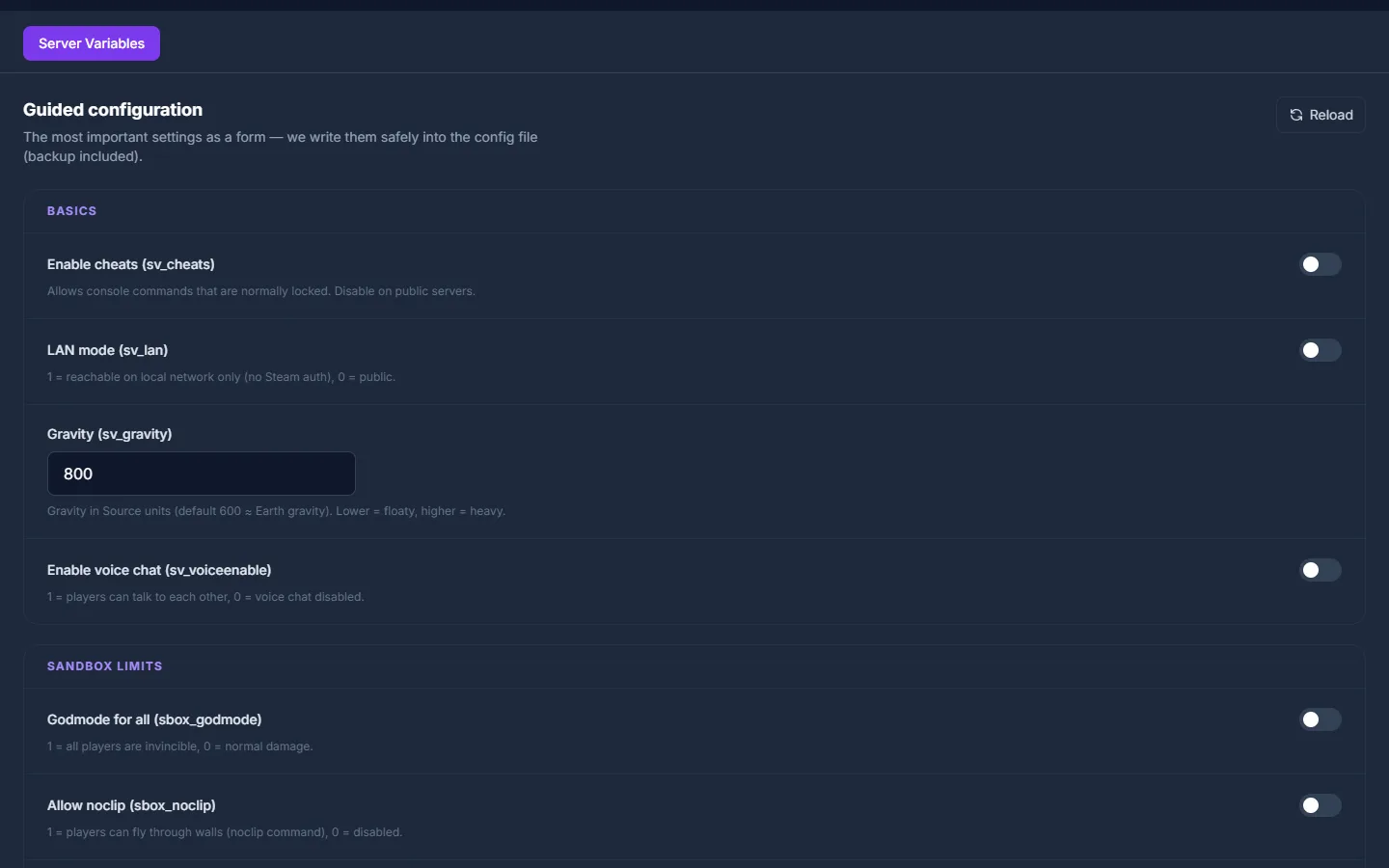
The most important Source server variables — sv_cheats, sv_gravity, voice chat and the sbox_ limits (props, ragdolls, vehicles, NPCs) — can be set directly in the panel via a guided form. game-serverhosting.de writes them safely into server.cfg (backup included), so you never have to edit the file by hand. You'll find the editor in the server panel under Game settings → Server variables.
Setting up TTT mode
Step 1: Set the game mode to TTT
In the startup configuration (Panel → Startup) set the parameter:
GAMEMODE=terrortown
Alternatively enter in server.cfg:
gamemode terrortown
Restart the server after the change — GMod will then automatically load the TTT game mode.
Step 2: Adjust TTT configuration
TTT settings are controlled via ConVars in server.cfg. The most important ones:
# Number of Traitors (fraction of total players)
ttt_traitor_pct 0.25
# Minimum Traitors per round
ttt_traitor_max 32

# Round time in seconds
ttt_roundtime_seconds 300
# Preparation time
ttt_preptime_seconds 30

# Karma system (friendly fire penalty)
ttt_karma 1
ttt_karma_starting 1000
ttt_karma_min 500

# Map rotation
mapcyclefile mapcycle.txt
Step 3: Set up TTT maps
TTT works best with dedicated TTT maps (prefix: ttt_). Create a mapcycle.txt in the garrysmod/ directory:
ttt_minecraft_b5
ttt_67thway_v8
ttt_rooftops_2016
ttt_dolls_v2
Maps must be present on the server — most easily via Workshop collection (see below).
Setting up a Workshop collection
The easiest way to get maps and addons onto your server is a Steam Workshop collection.
Creating a collection
- Go to https://steamcommunity.com/workshop/browse/?appid=4000
- Click "My Workshop Items" → "Create Collection"
- Add all desired maps, weapons and content packs
- Publish the collection (it must be public)
Entering the collection ID in the panel
In the panel under Startup, enter the Workshop collection ID:
WORKSHOP_ID=123456789
WORKSHOP_AUTH_KEY=YourSteamWebAPIKey
Create a Steam Web API key for free at https://steamcommunity.com/dev/apikey. The server automatically downloads all collection items on startup.
ULX — Admin tool for GMod
ULX is the standard admin framework for Garry's Mod. It provides a comprehensive command set for admins and a permission system (ULib) for granular access control.
Installing ULX
- Subscribe on Steam Workshop: ULX (https://steamcommunity.com/sharedfiles/filedetails/?id=557962280) and ULib
- Add both to your Workshop collection, or upload them manually to
garrysmod/addons/
Granting admin rights
Rights are set in the server console or via RCON:
ulx adduser "PlayerName" superadmin
ulx adduser "ModeratorName" admin
Key ULX commands
| Command | Function |
|---|---|
ulx ban <name> <minutes> <reason> |
Ban a player |
ulx kick <name> <reason> |
Kick a player |
ulx slay <name> |
Kill a player |
ulx tp <name> |
Teleport to a player |
ulx noclip <name> |
Toggle noclip |
ulx menu |
Open admin menu (F4 / console) |
TTT-specific addons
| Addon | Function |
|---|---|
TTT2 |
Extended TTT framework with new roles and features |
Randomats |
Random round events for more variety |
TTT Weapon Placer |
Place weapons on maps without code |
Custom Items |
Add custom Traitor/Detective items |
Common issues
"Missing content" — purple textures
Missing textures usually come from absent Valve game data (CS:S, HL2 etc.). Add a content pack like CS:S Weapons and Props to your Workshop collection.
Players don't see addon items
The client also needs to have subscribed to the Workshop items — or the cl_downloadall rate doesn't match. Add sv_allowupload 1 and sv_allowdownload 1 to server.cfg.
TTT round won't start
Check the minimum player count: TTT needs at least 2 players (default 2, recommended 4+). Check ttt_minimum_players in the config.
Conclusion
Running Garry's Mod TTT on your own server gives you full control over configuration, addons and moderation team. Workshop collections make content sync easy, and ULX provides professional server administration.
FAQ
Which map rotation do you recommend for TTT beginners?
For beginners, classic maps like ttt_minecraft_b5, ttt_67thway_v8 and ttt_rooftops_2016 are ideal. They are clear, well-balanced and part of every major TTT Workshop collection.
Do I need CS:S for a GMod server?
CS:S content (models, textures) is required by many addons and maps. You don't need CS:S installed on the server itself, but a Workshop content pack fixes the purple "Missing Texture" errors.
How many players is ideal for TTT?
TTT is most fun with 8–12 players, as the Traitor ratio (default: 25%) creates enough tension. Below 6 players the game feels thin; above 20 rounds can run very long.
Can I run multiple game modes on one server?
Not simultaneously — a GMod server always runs in one gamemode. You can switch modes via RCON or map change, or use multiple server slots for different modes.